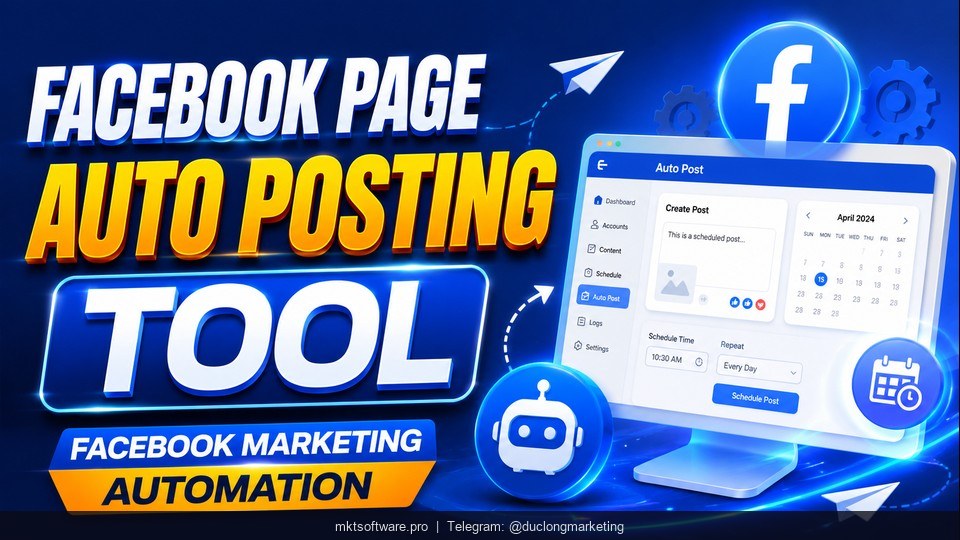
Running Facebook marketing manually can quickly become overwhelming. If you manage multiple Facebook groups, pages, or communities, spending hours posting content every day is not scalable.
Table of Contents
ToggleThat’s why many businesses, online sellers, and marketers are now looking for smarter ways to auto post to Facebook groups using a fanpage. Instead of manually copying and publishing content across dozens of groups, automation helps save time, maintain consistency, and increase reach.
In this guide, you’ll learn how to post to Facebook groups effectively using a fanpage, avoid common mistakes, and optimize your strategy for better engagement.
I. Why Post to Facebook Groups Using a Fanpage?
Facebook groups remain one of the best organic traffic sources for businesses. Unlike traditional page posts that may struggle with declining reach, group content can still generate strong engagement when done correctly.
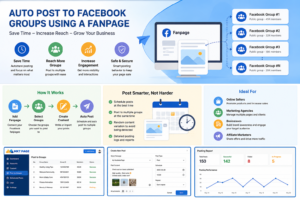
Using a Facebook fanpage instead of a personal account offers several advantages.
1. Build a Professional Brand Presence
A fanpage helps establish trust and credibility.
Instead of posting from a personal profile, your audience sees:
- A branded business identity
- Professional profile images and descriptions
- Contact details and business information
- Reviews and page credibility
For example, a beauty clinic posting in skincare communities through a branded fanpage appears far more trustworthy than an unknown personal account.
Over time, this strengthens brand recognition and improves customer trust.
2. Reach Highly Targeted Communities
One of the biggest advantages of Facebook groups is access to niche audiences.
Instead of relying entirely on paid ads, businesses can connect directly with communities that already care about specific topics.
Examples:
- Real estate → local housing groups
- Fitness brands → gym and wellness communities
- Parenting products → mom and baby groups
- Beauty services → skincare communities
When done correctly, posting in relevant groups becomes a powerful low-cost customer acquisition strategy.
3. Scale Your Marketing Efforts
Manual posting works when you are managing just a few groups.
But what happens when your business grows?
Imagine this scenario:
- 10 Facebook fanpages
- 50 Facebook groups
- 3 daily posts per group
That quickly turns into thousands of manual posting actions per month.
Without automation, this becomes time-consuming and inefficient.
II. How to Auto Post to Facebook Groups Using a Fanpage
If you want consistent visibility without spending hours every day, you need a structured process.
Here’s how to do it effectively.
Step 1: Optimize Your Facebook Fanpage
Before posting to groups, your fanpage should look trustworthy.
A weak or empty page can reduce engagement and credibility.
Here’s a quick checklist:
Your Fanpage Should Include:
- Professional profile picture and cover image
- Clear business description
- Contact information
- Consistent branding
- At least 10–20 quality posts before promotion
A page with no activity often struggles to gain trust from group members.
Think of your fanpage as your storefront. First impressions matter.
Step 2: Choose the Right Facebook Groups
A common mistake is posting everywhere.
More groups do not always mean better results.
Instead, prioritize:
Relevant groups over large groups
For example:
If you sell skincare products, posting in active beauty communities will outperform posting in general lifestyle groups.
Look for groups with:
- High engagement
- Active discussions
- Relevant audience demographics
- Real conversations (not spam-heavy environments)
Quality matters more than quantity.
Step 3: Create Non-Spammy Content
One major mistake businesses make is posting the exact same content repeatedly.
Facebook may limit repetitive content, and group members often ignore obvious promotional posts.
Instead, diversify your content.
Focus on helping first, selling second.
III. The Smart Way to Manage Multiple Fanpages
When your Facebook operations grow, manual posting eventually becomes inefficient.
This is where businesses often look for fanpage management tools to simplify operations.
Solutions like MKT Page help businesses manage multiple Facebook fanpages more efficiently, organize content schedules, and streamline posting workflows.
Instead of logging into multiple pages manually, businesses can centralize management and maintain consistent activity across their fanpage systems.
This is especially useful for:
- E-commerce stores
- Marketing agencies
- Affiliate marketers
- Real estate businesses
- Local service providers
By organizing your workflow properly, businesses can spend less time on repetitive tasks and focus more on customer acquisition.
Want to manage multiple fanpages more effectively? Consider building a structured Facebook workflow with tools like MKT Page to improve consistency and save time.
IV. Five Common Mistakes When Posting to Facebook Groups
Even with automation, poor strategy can hurt performance.
Avoid these mistakes.
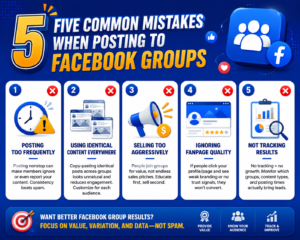
1. Posting Too Frequently
Spamming too many groups in a short period can reduce engagement.
Instead:
Create a posting schedule and spread activity naturally throughout the day.
2. Using Identical Content Everywhere
Copy-pasting one exact post across dozens of groups is risky.
Always modify:
- Captions
- Headlines
- Images
- Hooks
Variation makes your content look more authentic.
3. Selling Too Aggressively
People join groups for value, not advertisements.
If every post feels promotional, users will ignore you.
Instead, provide:
- Helpful tips
- Case studies
- Industry insights
- Tutorials
- Personal experiences
Build trust before pitching products.
4. Ignoring Fanpage Quality
A poorly maintained page reduces conversion.
If users click on your page and see no activity, they are less likely to trust your business.
Keep your page active and updated.
5. Not Tracking Results
Many marketers never measure performance.
Track metrics such as:
- Which groups generate engagement
- Best-performing post formats
- Posting times
- Conversion rates
This helps improve your strategy over time.
V. Best Practices for Auto Posting to Facebook Groups
To maximize results, follow these proven practices:
1. Post During Peak Hours
Test high-engagement times such as:
- Morning (7–9 AM)
- Lunch break (11 AM–1 PM)
- Evening (7–10 PM)
Different audiences behave differently, so test and optimize.
2. Rotate Content Types
Use a mix of:
- Educational posts
- Stories
- Testimonials
- Short videos
- Problem-solving content
Diverse content prevents audience fatigue.
3. Focus on Community Value
Successful Facebook marketing is about relationships.
The more useful your content feels, the more likely people are to engage, trust your brand, and eventually buy.
Watch the Step-by-Step Video Tutorial
See exactly how to auto post to Facebook groups using a fanpage. Follow the step-by-step setup process and learn how to optimize posting for better reach and engagement. Watch the full tutorial on Marketing Automation Software below.
Final Thoughts
Learning how to auto post to Facebook groups using a fanpage can significantly improve your marketing efficiency while helping you reach targeted communities organically.
The key is not simply posting more content.
Success comes from:
Posting to the right groups + creating valuable content + maintaining a professional fanpage presence.
If your business manages multiple fanpages or spends too much time posting manually, building a smarter Facebook workflow can help you save time and improve consistency.
By combining strategy with the right management process, Facebook groups can become one of your most powerful organic growth channels.